

Annotation guidelines are the single source of truth for any data labeling project. They are the instruction manual that ensures every person on your team labels data with the same consistent precision. This document is the critical asset that eliminates ambiguity, reduces errors, and builds the foundation for a high-performing AI model.
The Blueprint for High-Quality AI Data
Think of your annotation guidelines as the architectural blueprint for a skyscraper. If construction teams on different floors were operating without a unified plan, you would end up with a structurally unstable mess doomed to fail. It is the exact same story with AI projects.
Without clear, robust guidelines, you get inconsistent data labels. That inconsistency leads directly to a flawed, unreliable model. These guidelines are much more than procedural documents; they are a core strategic asset.
Well-crafted annotation guidelines establish one unified standard for quality, which directly impacts your project’s success in measurable ways. They are the bedrock of any data annotation pipeline that hopes to scale. It is how you ensure that whether you have ten annotators or a thousand, the output remains consistent and accurate.
The Foundation of Data Quality and Scalability
At its core, the goal is to eliminate all guesswork. When an annotator encounters an ambiguous scenario, and they always do, they should be able to open the guidelines and find a clear answer waiting for them.
This clarity delivers immediate and powerful benefits:
- Improved Model Accuracy: Consistent labels produce higher-quality training data, which is the single most important factor in developing an accurate model. The old saying holds true: garbage in, garbage out.
- Reduced Rework Costs: Clear instructions stop labeling errors before they start. This dramatically cuts down on the expensive and time-consuming process of QA and rework.
- Enhanced Scalability: Standardized guidelines let you onboard new annotators quickly and efficiently, allowing you to scale up your operations without sacrificing quality.
This disciplined approach is what separates successful projects from the ones that never get off the ground. The global data annotation market is projected to hit $12.5 billion by 2030, a massive expansion driven by an insatiable demand for high-quality AI. In this competitive space, solid guidelines have been shown to cut labeling errors by up to 30%, proving a direct link between clear instructions and operational excellence.
A great set of guidelines doesn’t just tell annotators what to do; it teaches them how to think about the data in the context of the project’s goals. It transforms a mechanical task into a cognitive one, empowering the human-in-the-loop to make better, more consistent decisions.
Ultimately, investing time in creating detailed annotation guidelines is one of the highest-return activities in the entire AI development lifecycle. It solidifies your understanding of why data quality is the real competitive edge in AI and sets the stage for building powerful, dependable models.
Core Components of World-Class Annotation Guidelines
Forget thinking of annotation guidelines as a simple document. The best ones are more like a complete operational toolkit. Each part has a specific job, and they all work together to stamp out ambiguity and give your annotators the power to create consistently amazing data. A surgeon would not walk into an operation with just a scalpel; they need forceps, sponges, and a full suite of tools. Your data labeling team is no different.
This framework shows how a clear project goal is held up by a solid foundation, which in turn balances on the three pillars of quality, cost, and scale.
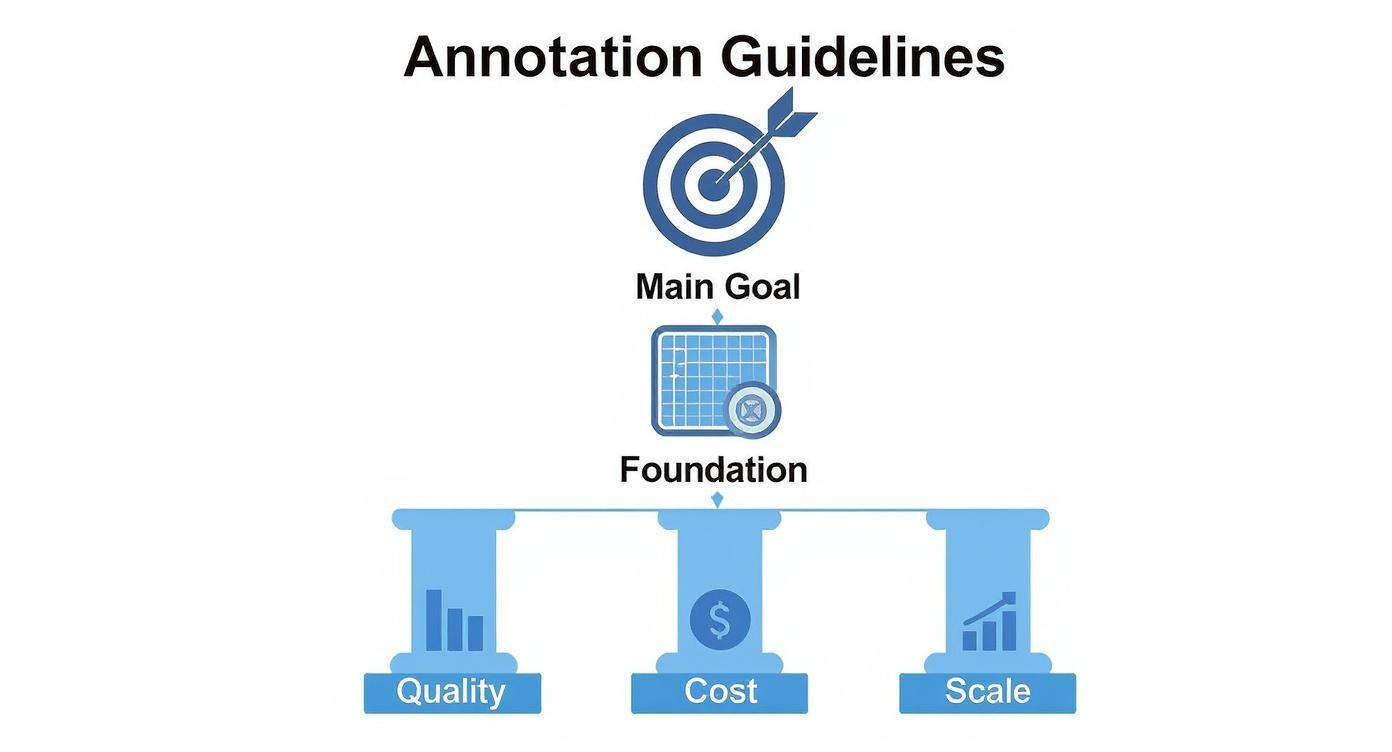
What this really means is that high-quality, scalable annotation at a fair price does not happen by accident. It is the direct result of building from a solid blueprint. If you pull out any one of these components, the whole structure gets wobbly, leading to project delays and a model that just does not perform.
To ensure your guidelines are robust, they need to include several key elements. Each one answers a critical question for the annotator, leaving nothing to chance.
Here’s a quick breakdown of the essential components that form the foundation of any effective annotation guideline.
Key Components of Effective Annotation Guidelines
| Component | Purpose | Best Practice Example |
|---|---|---|
| Label Taxonomy | Defines the “what”: a complete list of all possible labels. | For an e-commerce site: Shirt, Pants, Shoe, Accessory. Each class has a written definition. |
| Granular Instructions | Explains the “how”: the step-by-step mechanics of labeling. | “Bounding boxes must be tight to the object’s visible pixels, with no more than 2 pixels of padding.” |
| Edge Case Encyclopedia | Addresses the “what ifs”: a library of ambiguous or tricky examples. | An image of a person holding a photo of a car. The rule: “Do not label objects within photos.” |
| Good vs. Bad Examples | Provides a clear visual benchmark for quality. | Side-by-side images showing a correctly drawn polygon versus one that is too loose or misses a vertex. |
| Quality Assurance Rules | Defines how quality will be measured and enforced. | “At least 10% of all submissions will be reviewed. Submissions with an error rate over 5% will be rejected.” |
By including each of these components, you create a single source of truth that aligns your entire team, from project managers to individual annotators, on the definition of “correct.”
H3: Defining the “What”: The Label Taxonomy
The label taxonomy is the absolute heart of your guidelines. It is a complete list of every possible class or label that can be applied to your data. This is where you state, without a doubt, what you are asking annotators to find.
For instance, a self-driving car project might have classes like Vehicle, Pedestrian, Cyclist, and Traffic Sign. But a great taxonomy goes deeper. Is Vehicle just one class, or should it be split into Car, Truck, Bus, and Motorcycle?
Every single class needs a precise, written definition that leaves zero room for interpretation. This is your first and best defense against inconsistency, making sure every annotator shares the same mental model for each label.
H3: Detailing the “How”: Granular Instructions
While the taxonomy defines the “what,” the granular instructions explain the “how.” Think of this as the step-by-step procedure that spells out the mechanics of applying each label. These instructions are essential for making sure every label is applied with the same technical precision.
For an image annotation project, this could include rules like:
- Bounding Box Tightness: The box must hug the object’s visible pixels as tightly as possible without cutting off any part of it.
- Object Occlusion: If an object is more than 50% hidden, do not label it. If it is less than 50% hidden, label only the part you can see.
- Labeling Direction: Always start drawing a polygon from the object’s top-left corner and move clockwise.
These might seem like tiny details, but they make a world of difference. They standardize the physical act of annotation, taking individual judgment out of the equation and creating a truly uniform dataset.
H3: Addressing the “What Ifs”: The Edge Case Encyclopedia
No project is perfect, and raw data is almost never clean. The edge case encyclopedia is your proactive library of all the weird, ambiguous, or challenging examples you know your annotators will run into. This is where you tackle the “what ifs” before they become full-blown problems.
It is basically a visual FAQ. For a medical imaging project, an edge case might be a blurry X-ray or an image artifact that looks like a lesion. Your encyclopedia should show the image, explain why it is tricky, and give a crystal-clear directive on how to label it (or if it should be skipped).
By documenting and solving ambiguity upfront, you stop annotators from having to make subjective guesses. This one practice alone drastically cuts down on errors and the need for expensive rework, turning what could be confusion into a clear, documented rule.
H3: Providing Visual Benchmarks: Good vs. Bad Examples
Words can only get you so far. A library of “good” vs. “bad” examples gives annotators instant visual clarity that a paragraph of text never could. For every important rule in your guidelines, you should have a side-by-side comparison showing the right way and the wrong way to do it.
This is an incredibly powerful way to teach concepts like bounding box tightness or polygon accuracy. When you put a perfect annotation right next to one that is too loose, too tight, or incomplete, you create an unmistakable benchmark for quality.
The data backs this up. One comprehensive study found that projects with detailed visual guidelines hit inter-annotator agreement (IAA) rates of 85% or higher. Meanwhile, projects with vague instructions struggled to get past 60-70%. The same study showed that clear instructions improved annotation efficiency by a whopping 20%.
How to Tailor Guidelines for Different Data Types
One of the most common mistakes in AI projects is treating annotation guidelines like a one-size-fits-all document. That could not be further from the truth.
The unique quirks of each data type, or modality, demand a completely custom approach. Think about it: you would not use the same tools to sculpt wood and stone. In the same way, your guidelines have to be shaped for the specific data you are labeling.
If you do not tailor your instructions, you are setting your annotators up for confusion, which leads to inconsistent labels. And that leads to a model that just will not perform. A generic rule for drawing a bounding box around a car in a 2D photo is completely useless when you are annotating a 3D point cloud, where depth and orientation are everything. Success hinges on creating modality-specific rules that tackle the distinct challenges of each data type.

This level of detail gives your annotators the tools they need to handle the specific nuances they will face, paving the way for higher-quality data and a much more robust AI model.
Guidelines for Image and Video Annotation
For computer vision tasks, it is all about visual precision. The main goal here is to eliminate any ambiguity in how objects are defined in 2D space. Your instructions need to be granular and, most importantly, full of visual examples.
Key things to define in your guidelines include:
- Bounding Box Tightness: Get specific about the maximum allowable pixel padding. A solid rule of thumb is no more than 2 to 3 pixels of background space inside the box.
- Handling Occlusion: Create a clear, non-negotiable threshold. For instance, “If more than 60% of an object is hidden by another, do not label it. If it is less, label only the visible part.”
- Pixel-Perfect Segmentation: For polygon or mask annotations, define the rules for placing each vertex. Should the mask trace an object’s shadow? Your guidelines must give a firm “yes” or “no.”
Use Case Example: Imagine a retail AI model designed to track on-shelf availability. It needs pixel-perfect segmentation to tell the difference between two nearly identical products. The guidelines have to show annotators exactly how to trace the outline of a soda bottle, making it crystal clear that reflections and shadows should be excluded to stop the model from miscounting inventory.
Guidelines for LiDAR and 3D Point Clouds
When you jump from 2D images to 3D point clouds, you are adding a whole new layer of complexity. Guidelines for technologies like LiDAR have to account for depth, orientation, and how an object stays consistent across multiple frames. Precision here is not just about a tight box; it is about correctly capturing an object in three-dimensional space.
This calls for a completely different set of rules.
Your LiDAR annotation guidelines must transition annotators from thinking in pixels to thinking in volumes. The focus shifts from outlining a shape to defining a 3D cuboid that accurately represents the object’s real-world footprint, orientation, and trajectory.
Instructions for 3D data need to cover:
- Cuboid Fitting: Define how the 3D box should align with the object. Should it always be parallel to the ground, or should it match the object’s angle, like a car parked on a steep hill?
- Point Inclusion: Specify the minimum number of LiDAR points that must be inside a cuboid for it to count as a valid object. This stops annotators from labeling sparse, random clusters of data that are not actually objects.
- Frame-to-Frame Consistency: Make sure an object’s unique ID and cuboid dimensions stay stable as it moves through a sequence. This is absolutely essential for object tracking.
Use Case Example: For self-driving cars, LiDAR data is the foundation of safe navigation. Our guide on how LiDAR annotation is powering autonomous systems dives deep into this. The annotation guidelines must be incredibly clear on how to label a pedestrian, ensuring the 3D cuboid is tall enough for their full height but narrow enough to exclude swinging arms. This prevents the perception system from getting a wrong read on their size and where they are headed.
Guidelines for Text and Audio Annotation
With text and audio data, the challenges are linguistic and contextual, not visual. For Natural Language Processing (NLP) or speech recognition projects, your guidelines need to define abstract concepts with absolute clarity.
For text annotation, your guidelines should cover:
- Entity Boundaries: When doing Named Entity Recognition (NER), where does an entity start and end? Is “Dr. Jane Smith” a single
PERSONentity, or should “Dr.” be its ownTITLEentity? The guidelines have to pick one and stick to it. - Sentiment Nuance: For sentiment analysis, define your scale (e.g., positive, neutral, negative) and provide clear examples for tricky situations like sarcasm, which machines can easily get wrong.
For audio annotation, you need to address:
- Overlapping Speech: Tell annotators exactly how to handle situations where multiple people are talking at once. Do they transcribe both speakers on separate tracks, or just focus on the main speaker?
- Labeling Non-Speech Sounds: Create a clear taxonomy for background noises. Should a cough be labeled
[cough],[human_sound], or just ignored? Whatever you decide, consistency is king.
Use Case Example: A company building a customer service chatbot needs to analyze support transcripts. Its text annotation guidelines have to clearly distinguish a Complaint from a Feature Request. An example showing that “The app keeps crashing” is a Complaint, while “I wish the app had a dark mode” is a Feature Request, helps annotators accurately categorize user feedback for the product team.
Best Practices for Developing and Maintaining Guidelines
Crafting a solid set of annotation guidelines is a huge accomplishment, but it is really just the starting line. The single biggest mistake teams make is treating this document like a static file, something that, once finished, is set in stone. The reality is that your project, your data, and your own understanding will all change. Your guidelines have to evolve right alongside them.
Think of your guidelines not as a carved tablet but as a living document. It needs a support system to stay healthy, relevant, and effective for the entire project. This means building a strategic framework for ongoing maintenance, not just for the initial development.

Adopting best practices for managing this lifecycle is what separates successful, scalable AI initiatives from the ones that collapse under the weight of poor quality and constant rework. It is about building a process, not just a document.
Foster Collaborative Development
The most effective guidelines are never created in a vacuum. While data scientists and project managers have a clear vision for the model’s goals, it is the annotators on the front lines who have invaluable, practical insights. They are the ones who will grapple with the real-world messiness of the data day in and day out.
Bringing these two groups together during the drafting process is absolutely essential.
- Data Scientists: They define the “why,” explaining the model’s objectives and why certain labels are so important.
- Annotators: They provide the “how,” flagging ambiguous rules, suggesting clearer language, and pointing out likely edge cases from their own experience.
This team-based approach ensures the final document is both theoretically sound and practically usable. It prevents a ton of downstream confusion and helps get the whole team bought into the process.
Implement Rigorous Version Control
As your guidelines evolve, you absolutely must have a system to manage the changes. Without proper version control, different annotators could be working from outdated rules, creating inconsistencies that will poison your dataset. This is not just about avoiding confusion; it is a fundamental quality control mechanism.
A simple but effective version control system is your project’s single source of truth. It guarantees that every label applied, from day one to day one hundred, adheres to the exact same set of rules, ensuring dataset integrity over time.
Your system should include a few key things:
- A Version History Table: Put this right at the beginning of the document. For every update, log the version number, the date, a quick summary of what changed, and who authorized it.
- Clear Filenaming Conventions: Use a consistent naming scheme like
ProjectName_Guidelines_v1.2.pdf. Simple, but it works. - Centralized Distribution: Store the master document in a single, accessible place. Whenever an update is released, proactively communicate the changes to the entire team so no one is left behind.
Establish Iterative Refinement Loops
Your annotators are your first line of defense against ambiguity. You have to create a clear, frictionless feedback loop for them to ask questions and suggest improvements. This approach transforms them from passive labelers into active partners in quality assurance.
Set up a formal process for this feedback. It could be a dedicated Slack channel, a regular Q&A session, or a simple shared document where questions can be logged. When a question reveals a gap in the guidelines, the answer should not just go to the person who asked. It should be used to update the master document for everyone’s benefit. This continuous cycle of feedback and refinement is what makes your guidelines stronger and more comprehensive over time.
Mandate Pilot Testing Before Scaling
Never roll out a new or significantly updated set of guidelines to your full team without testing it first. A small-scale pilot test is a crucial step to pressure-test your instructions and identify points of confusion before they impact your entire project. This is a key consideration when you evaluate data annotation companies before outsourcing, you want to be sure they have robust quality processes in place.
Just select a small, representative batch of data and assign it to two or three of your experienced annotators. The main goal here is to measure Inter-Annotator Agreement (IAA), a metric that quantifies how consistently different people apply the labels. Low IAA scores are a bright red flag that a specific rule is ambiguous and needs to be rewritten. This pre-deployment check lets you catch and fix issues early, ensuring a much smoother and more efficient scaling process.
Common Pitfalls in Guideline Creation and How to Avoid Them
Even the sharpest teams run into the same old traps when creating annotation guidelines. These slip-ups might seem small, but they quietly inject ambiguity into your workflow. The result? Inconsistent data that tanks your model’s performance and forces you into expensive rework.
Think of it like trying to navigate a minefield. Each pitfall is a hidden explosive that can blow up your project’s timeline and budget. Knowing where they are is the first step to disarming them.
Here’s a rundown of the most common mistakes we see and how to steer clear of them, keeping your data clean and your project moving forward.
Assuming Prior Knowledge
This is by far the biggest mistake we see. Project managers and data scientists are so deep in the weeds of their own work that they forget the annotators are not. They write instructions filled with internal acronyms and technical shorthand, assuming a level of domain expertise that a new annotator just does not have.
This creates a document that is confusing and frankly useless. When annotators have to guess, they will. And every guess is a crack in the foundation of your data consistency.
The Solution: Write for a complete beginner. Assume the person reading knows absolutely nothing about your project, your industry, or even what data annotation is.
- Define Everything: Every single term, label, or acronym needs a clear, simple definition the first time it appears.
- Explain the “Why”: Give your annotators a little context. Knowing the project’s end goal helps them make smarter judgment calls when they hit a grey area.
- Keep it Simple: Use direct language and avoid complex sentence structures. Clarity is king.
Using Overly Complex Language
This one goes hand-in-hand with the first pitfall. Some guidelines read like an academic paper, packed with jargon like “isomorphic consistency” or “semantic drift.” While these terms might be technically correct, they mean nothing to an annotator who has to look them up. The goal is instant comprehension, not showing off your vocabulary.
Complex language forces annotators to interpret your meaning, and every interpretation is a potential error. The power of clear instructions is well-documented. For instance, educational studies show that students using clear, structured resources can perform up to 25% better on tests. The same principle applies here; clarity is directly tied to accuracy. Learn more about the impact of clear guidelines in educational settings.
The Solution: Simplify relentlessly and use visuals.
- The Ten-Year-Old Test: If a child could not understand the instruction, rewrite it.
- Show, Don’t Just Tell: A side-by-side “Good vs. Bad” image example is worth a hundred words. Use them everywhere you can.
- Use Analogies: Relate complex rules to simple, real-world scenarios. It helps the concepts stick.
Neglecting Edge Cases
Let’s be honest: no dataset is perfect. You are going to find weird, ambiguous, and confusing examples that defy your perfectly crafted rules. Failing to document these edge cases is a critical mistake. When an annotator finds something that is not in the rulebook, they can either stop and ask for help or take their best guess.
Neither option is good. The first crushes productivity, and the second pollutes your dataset with inconsistent labels.
Your edge case library is not just a troubleshooting guide; it is a strategic asset. Every time you document a tricky scenario and its solution, you are building institutional knowledge that makes your entire annotation operation smarter and more efficient.
The Solution: Treat your guidelines as a living document and create an “Edge Case Encyclopedia” from day one.
- Start with What You Know: Before you even begin, brainstorm all the tricky examples you can think of and get them documented.
- Create a Feedback Channel: Make it easy for annotators to flag new, undocumented edge cases. A dedicated Slack channel or a simple form works great.
- Update Immediately: As soon as a new edge case is resolved, add it to the central guidelines. This ensures the entire team benefits from the decision right away.
By systematically tackling these common pitfalls, you can build a rock-solid set of guidelines that prevents errors and empowers your team to deliver consistently high-quality data.
Frequently Asked Questions About Annotation Guidelines
Even the most buttoned-up plan will spark questions when it comes to annotation guidelines. That is a good thing. Tackling these common uncertainties early saves time, prevents confusion, and keeps your team focused on what really matters: data quality.
Here are the answers to a few of the most common questions we hear from project managers and data scientists.
How Long Should My Annotation Guidelines Be?
There is no magic number here. The length of your annotation guidelines should be driven entirely by the complexity of your project, not a specific page count. The goal is total clarity, not brevity.
For a simple image classification task with a handful of classes, a crisp 5 to 10-page document might be all you need. It would cover the label taxonomy, core rules, and a few solid examples.
But for something like semantic segmentation for an autonomous vehicle, a project with dozens of classes and tricky rules for occlusion and boundaries, the guidelines could easily top 50 pages. The document needs to be exhaustive enough to cover every class, rule, and edge case so an annotator can work independently without constantly stopping to ask questions.
The rule of thumb is this: your guidelines are complete when an annotator can handle 99% of the data without needing clarification. Focus on being thorough, not brief.
How Can I Measure the Effectiveness of My Guidelines?
You cannot improve what you do not measure. Gauging the effectiveness of your guidelines requires a mix of hard numbers and human feedback. Together, they give you a complete picture of how well your instructions are translating into high-quality labels.
Quantitative metrics give you the raw performance data:
- Inter-Annotator Agreement (IAA): This is the gold standard. It measures how consistently multiple annotators label the same piece of data. A high IAA score, typically 90% or more, is a clear sign your guidelines are working.
- Error Rate During QA: Keep a close eye on the percentage of labels flagged for rework during your quality assurance reviews. A low and stable error rate means the instructions are being understood and followed.
- Annotation Speed: While not a direct measure of quality, you should see annotation speed improve over time. If annotators are getting faster, it suggests the guidelines are easy to navigate and apply, reducing their cognitive load.
Qualitative feedback tells you the why behind the numbers. Set up regular check-ins with your annotation team. Ask them directly: which sections are crystal clear? And more importantly, which parts are causing confusion? This direct input is priceless for fine-tuning your document.
What Is the Best Way to Handle Guideline Updates?
Your guidelines should be a living document, not a static PDF. That means you need a rock-solid process for managing updates. A disorganized approach to changes is a fast track to confusion and inconsistent data. The best method combines strict version control with crystal-clear communication.
First, use a formal version control system. Every single update, no matter how small, needs to be logged in a version history table at the top of the document. This log must include:
- Version Number (e.g., v1.1, v1.2)
- Date of Change
- Summary of Changes (a clear, brief description of what was added, removed, or tweaked)
- Authorizer (the person who signed off on the change)
Second, you have to communicate. Just updating the file and hoping for the best will not cut it. Send a notification to the entire annotation team summarizing the key changes. This proactive step ensures everyone is aware of the new rules and working from the latest version. For major updates that change core logic, it is smart to hold a quick retraining session to walk the team through the new instructions and answer questions on the spot.
Should I Include Examples of Bad Annotations?
Absolutely. Showing examples of incorrect or “bad” annotations is just as important as showing correct ones. It is a powerful way to create a visual contrast that helps annotators instantly understand the rules and sidestep common pitfalls.
Written instructions can be too abstract. Simply telling someone to “make bounding boxes tight” is far less effective than showing a side-by-side comparison: one image with a perfect bounding box and another with a box that is obviously too loose.
These counter-examples do a few critical things:
- They Kill Ambiguity: Visually demonstrating what not to do is often the clearest way to define what you do want.
- They Cut Down on Common Errors: By highlighting frequent mistakes upfront, you are training annotators to spot and avoid them from day one.
- They Speed Up Onboarding: New team members can get up to speed much faster when they have clear visual benchmarks for both good and bad work.
Think of it as giving them the complete picture. By showing both sides of the coin, you build a more robust and intuitive set of guidelines, which leads directly to higher-quality data.
At Prudent Partners, we specialize in building and managing data annotation projects founded on exceptionally clear and detailed guidelines. We know firsthand that your AI model is only as good as the data it is trained on. Our expert teams and rigorous quality assurance processes deliver the precision, accuracy, and scale you need to turn your data into a dependable strategic asset.
Connect with us today to discuss your project and build a custom data solution that drives results.